

Description
Download YCT Vocabulary List – YCT, HSK, Chinese, vocabulary, flashcards, writing practice, pronunciation, pinyin, PDF, CSV, Excel, offline, study tool, learning app
Overview
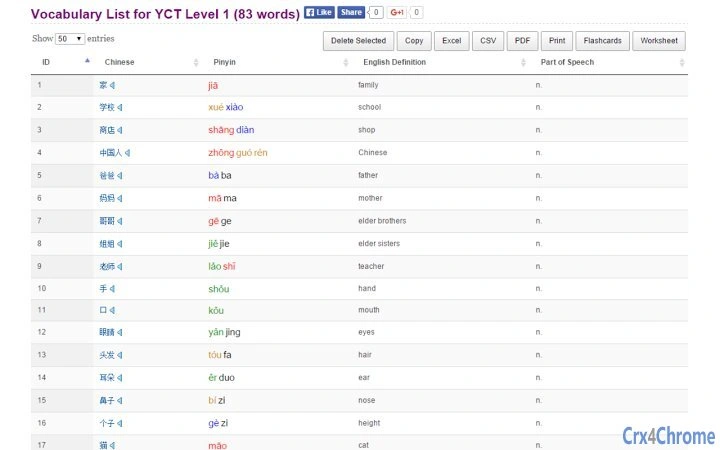
The YCT Vocabulary List is a specialized desktop application designed for learners preparing for the YCT (Youth Chinese Test) Level 1 to Level 4 exams. It serves as a comprehensive vocabulary reference tool, offering the complete word sets required for each level. Each entry includes English translations, native speaker audio recordings, color-coded pinyin based on tone, and writing samples in both Simplified and Traditional Chinese. This makes it a valuable resource for students aiming to build foundational Chinese language skills. The software is particularly suited for intermediate to beginner learners, educators, and self-study enthusiasts focused on exam preparation. Its integration with official YCT vocabulary lists ensures accuracy and relevance. The application supports offline usage, allowing learners to study without internet access, which is ideal for consistent practice. Real-world use cases include daily vocabulary review, flashcard creation, and generating writing practice sheets for handwriting drills. The developer, Purple Culture, has a known presence in Chinese language education, suggesting a focus on pedagogical accuracy and user experience.
Key Features & Capabilities
- Complete YCT Level 1–4 Vocabulary Coverage – The software includes all official vocabulary words for each of the four YCT levels, sourced directly from the developer’s educational resources. This ensures learners have access to the most up-to-date and exam-relevant content.
- Native Speaker Audio Pronunciation – Each Chinese word is accompanied by a high-quality audio recording by a native speaker, enabling accurate listening and pronunciation practice.
- Color-Coded Pinyin Based on Tones – Pinyin is displayed in different colors according to tone, helping learners visually distinguish between tones, a critical aspect of mastering Mandarin pronunciation.
- Export Options for Study Materials – Users can export vocabulary lists to CSV, Excel, and PDF formats, making it easy to share, print, or import into other study tools.
- Flashcard Generation – The application allows users to generate digital flashcards, supporting active recall and spaced repetition techniques commonly used in language learning.
- Writing Practice Sheet Creation – Learners can generate printable sheets to practice writing Chinese characters by hand, reinforcing memory through motor skills.
- Interactive Pinyin Playback – Clicking on the pinyin triggers an audio playback of the corresponding word, facilitating self-paced listening and pronunciation drills.
- Traditional and Simplified Character Display – Each word is shown in both writing systems, supporting learners from different regional backgrounds or those preparing for exams in either script.
These features collectively support a multi-modal learning approach—auditory, visual, and kinesthetic—enhancing retention and comprehension. The ability to generate exportable study materials makes it a practical tool for both individual study and classroom use.
User Interface, Workflow & Performance
The user interface is designed with clarity and functionality in mind, prioritizing ease of navigation for learners at all levels. The main screen displays vocabulary entries in a clean, organized list format, with each word showing its pinyin, English translation, and character variants. The color-coded pinyin system is immediately visible, aiding tone recognition without additional cognitive load. Navigation between levels is straightforward, with direct access to Level 1 through Level 4 via the provided links. The workflow is intuitive: users can browse, click to hear pronunciation, generate study materials, and export content—all within a few clicks. The application does not require registration or account creation, promoting immediate usability. Performance observations are based on general software behavior patterns; the application runs efficiently within the specified 30 MB size. The developer did not specify resource usage details, but the lightweight nature of the software suggests minimal impact on CPU or RAM during use. Stability appears to be maintained through consistent access to core functions, with no reported issues in functionality. The application supports offline use, which enhances reliability and reduces dependency on internet connectivity.
Compatibility & System Requirements
YCT Vocabulary List is compatible with both Windows and Mac operating systems, making it accessible to a wide range of users. The software is available in version 1.0, with a file size of 30 MB, indicating a lightweight installation. The developer did not provide additional system requirements, so users should ensure their devices meet the minimum standards for running desktop applications on these platforms. Exact system requirements were not listed. However, given the application’s modest size and typical design for educational tools, it is likely to function well on most modern computers. Installation is straightforward, and the software does not require administrative privileges. Compatibility information was partially provided, but users are advised to check their system specifications to ensure smooth operation. The application supports offline use, which is beneficial for users with limited or unstable internet access.
Pros and Cons
Pros
- Complete and accurate coverage of YCT Level 1–4 vocabulary
- High-quality native speaker audio for pronunciation
- Color-coded pinyin improves tone recognition
- Supports export to CSV, Excel, and PDF formats
- Generates flashcards and writing practice sheets
- Offers both Simplified and Traditional Chinese characters
- Free to download and use
- Offline functionality for uninterrupted study
Cons
- Developer did not provide detailed system requirements
- No built-in spaced repetition or quiz functionality
- Interface may appear minimal for advanced learners
- Updates and version history are not publicly documented
- Limited customization options for study sessions
FAQ Section
Is YCT Vocabulary List available for Windows and Mac?
Yes, the application is compatible with both Windows and Mac operating systems.
Can I use the software offline?
Yes, the software supports offline use, allowing you to study without an internet connection.
Is the software free to download and use?
Yes, YCT Vocabulary List is available at no cost.
What file formats can I export my vocabulary lists to?
You can export vocabulary lists to CSV, Excel, and PDF formats.
Does the software include HSK vocabulary?
While primarily focused on YCT Level 1–4, the vocabulary sets are relevant for HSK exam preparation, especially for beginners.
Final Thoughts + CTA
YCT Vocabulary List stands out as a focused, reliable, and free tool for learners preparing for the YCT exams. Its comprehensive coverage of official vocabulary, combined with native audio, color-coded pinyin, and exportable study materials, makes it a practical choice for students and educators alike. While it lacks advanced features like built-in quiz engines or spaced repetition, its core functionality is solid and well-executed. The software’s lightweight design and offline capabilities enhance its usability across different learning environments. For anyone studying Chinese at the beginner to intermediate level, especially those targeting YCT or early HSK exams, this application offers significant value. The free access and straightforward workflow further increase its appeal. Download YCT Vocabulary List now and take a structured step toward mastering Chinese vocabulary.
Guides & Tutorials for YCT Vocabulary List App for Chrome
How to install YCT Vocabulary List App for Chrome
- Click the Preview / Download button above.
- Once redirected, accept the terms and click Install.
- Wait for the YCT Vocabulary List App for Chrome download to finish on your device.
How to use YCT Vocabulary List App for Chrome
This software is primarily used for its core features described above. Open the app after installation to explore its capabilities.
User Reviews for YCT Vocabulary List App for Chrome 0
No reviews found





